Introduction
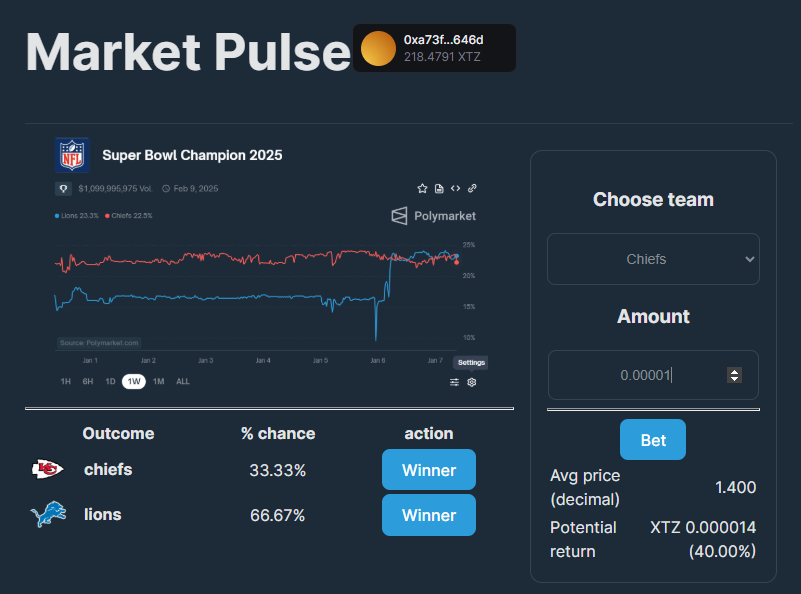
This guide is an Etherlink tutorial to create a real application from scratch for a betting platform. It allows users to bet cryptocurrency on the outcome of Super Bowl Championship as a way of demonstrating how to deploy and run dApps on the Etherlink platform.
Learning objectives
In this tutorial, you will learn:
- How to set up a development environment with Hardhat
- How to write a simple smart contract in Solidity
- How to create an Etherlink account and get testnet tokens using the faucet
- How to test a smart contract locally
- How to use Hardhat to deploy the contract to Etherlink
- How to verify your contract on the Etherlink explorer
- How to create a frontend application to interact with the smart contract using Viem and Thirdweb
- How to design a CI/CD pipeline with Github Actions and deploy the frontend with Vercel
Not included
This tutorial is not intended to be a complete course for developing smart contracts with Solidity or Hardhat or for developing frontend applications; the smart contract and frontend application in this tutorial are just examples. Also, the tools in this tutorial are only examples of tools that you can use with Etherlink. You can use many different smart contract and frontend development tools and technologies with Etherlink.
Disclaimer
The code is for education purposes and hasn’t been audited or optimized. You shouldn’t use this code in production
Set up a development environment for Etherlink
Etherlink is 100% compatible with Ethereum technology, which means that you can use any Ethereum-compatible tool for development, including Hardhat, Foundry, Truffle Suite, and Remix IDE. For more information on tools that work with Etherlink, see Developer toolkits in the Etherlink documentation.
In this tutorial, you use Hardhat to manage development tasks such as compiling and testing smart contracts. You also use Viem, which is a lightweight, type-safe Ethereum library for JavaScript/TypeScript. It provides low-level, efficient blockchain interactions with minimal abstraction.
-
Initialize an Node project with NPM:
npm init -y npm install -D typescript @types/node ts-node -
Install Hardhat and initialize it:
npm install -D hardhat npx hardhat init -
In the Hardhat prompts, select
Create a TypeScript project (with Viem). -
At the prompt
Do you want to install this sample project's dependencies with npm (@nomicfoundation/hardhat-toolbox-viem)? (Y/n)selectY. -
Install
@openzeppelin/contractsto use the Math library for safe calculations:npm i @openzeppelin/contracts -
Install dev libraries for verifying your smart contract:
npm i -D @nomicfoundation/hardhat-verifyVerify is a feature that verifies contracts on an Ethereum block explorer by checking the compiled code against the source code. Verifying your contracts provides source code transparency and a source reference for some tools to generate utility code
-
(Optional) If you are using VsCode for development, install the Hardhat/Solidity plugin from Nomic: Solidity plugin for VsCode
Create a smart contract
Etherlink runs contracts like the Solidity language. For more information about Solidity, see https://docs.soliditylang.org.
Follow these steps to set up a Solidity smart contract:
-
Remove the default Solidity smart contract
Lock.solin the./contractsfolder. -
Create a new file named
Marketpulse.solin the./contractsfolder.touch ./contracts/Marketpulse.sol -
Put this code in the file:
// SPDX-License-Identifier: MIT
pragma solidity ^0.8.24;

// Use console.log for Hardhat debugging
import "hardhat/console.sol";

import "@openzeppelin/contracts/utils/math/Math.sol";

/**
 * @title Marketpulse
* @author Benjamin Fuentes
*/
contract Marketpulse {
    using Math for uint256;

    struct Bet {
        uint256 id;
        address payable owner;
        string option;
        uint256 amount; //wei
    }

    enum BET_RESULT {
        WIN,
        DRAW,
        PENDING
    }

    uint256 public constant ODD_DECIMALS = 10;
    uint256 public constant FEES = 10; // as PERCENTAGE unit (%)

    /** SLOTS */
    address payable public admin;
    mapping(uint256 => Bet) public bets;
    uint256[] public betKeys;
    BET_RESULT public status = BET_RESULT.PENDING;
    string public winner;

    event Pong();

    constructor() payable {
        admin = payable(msg.sender);
    }

    /**
     * Getter /setter
    */
    function getBetKeys() public view returns (uint256[] memory) {
        return betKeys;
    }

    function getBets(uint256 betId) public view returns (Bet memory bet) {
        return bets[betId];
    }

    /** Utility
     *
    * */

    function addressToString(
        address _addr
    ) public pure returns (string memory) {
        bytes memory alphabet = "0123456789abcdef";
        bytes20 value = bytes20(_addr);
        bytes memory str = new bytes(42);

        str[0] = "0";
        str[1] = "x";

        for (uint i = 0; i < 20; i++) {
            str[2 + i * 2] = alphabet[uint(uint8(value[i] >> 4))];
            str[3 + i * 2] = alphabet[uint(uint8(value[i] & 0x0f))];
        }

        return string(str);
    }

    /**
     * Simple Ping
    */
    function ping() public{
        console.log("Ping");
        emit Pong();
    }

    function generateBetId() private view returns (uint256) {
        console.log("Calling generateBetId");
        return
            uint256(
                keccak256(
                    abi.encodePacked(
                        block.timestamp,
                        block.prevrandao,
                        msg.sender
                    )
                )
            );
    }

    /**
     * place bets and returns the betId
    */
    function bet(
        string calldata selection,
        uint256 odds
    ) public payable returns (uint256) {
        require(msg.value > 0, "Bet amount must be positive.");
        require(
            msg.value <= msg.sender.balance,
            "Insufficient balance to place this bet."
        );

        uint256 betId = generateBetId();

        bets[betId] = Bet({
            id: betId,
            option: selection,
            amount: msg.value,
            owner: payable(msg.sender)
        });
        betKeys.push(betId);

        console.log("Bet %d placed", betId);

        console.log(
            "Bet placed: %d on %s at odds of %d",
            msg.value,
            selection,
            odds
        );
        return betId;
    }

    /**
     *
    * @param option selected option
    * @param betAmount (Optional : default is 0) if user want to know the output gain after putting some money on it. Otherwise it gives actual gain without betting and influencing odds calculation
    * @return odds (in ODDS_DECIMAL unit)
    */
    function calculateOdds(
        string memory option,
        uint256 betAmount //wei
    ) public view returns (uint256) {
        console.log(
            "calculateOdds for option %s and bet amount is %d",
            option,
            betAmount
        );

        uint256 totalLoserAmount = 0; //wei
        for (uint i = 0; i < betKeys.length; i++) {
            Bet memory bet = bets[betKeys[i]];

            if (keccak256(bytes(bet.option)) != keccak256(bytes(option))) {
                (bool success, uint256 result) = totalLoserAmount.tryAdd(
                    bet.amount
                );
                require(success, "Cannot add totalLoserAmount and bet.amount");
                totalLoserAmount = result;
            }
        }
        console.log("totalLoserAmount : %d", totalLoserAmount);

        uint256 totalWinnerAmount = betAmount; //wei
        for (uint i = 0; i < betKeys.length; i++) {
            Bet memory bet = bets[betKeys[i]];

            if (keccak256(bytes(bet.option)) == keccak256(bytes(option))) {
                (bool success, uint256 result) = totalWinnerAmount.tryAdd(
                    bet.amount
                );
                require(success, "Cannot add totalWinnerAmount and bet.amount");
                totalWinnerAmount = result;
            }
        }
        console.log("totalWinnerAmount  : %d", totalWinnerAmount);
        uint256 part = Math.mulDiv(
            totalLoserAmount,
            10 ** ODD_DECIMALS,
            totalWinnerAmount
        );

        console.log("part per ODD_DECIMAL : %d", part);

        (bool success1, uint256 oddwithoutFees) = part.tryAdd(
            10 ** ODD_DECIMALS
        );
        require(success1, "Cannot add part and 1");

        console.log("oddwithoutFees  : %d", oddwithoutFees);

        (bool success2, uint256 odd) = oddwithoutFees.trySub(
            (FEES * 10 ** ODD_DECIMALS) / 100
        );
        require(success2, "Cannot remove fees from odd");

        console.log("odd  : %d", odd);

        return odd;
    }

    function resolveResult(
        string memory optionResult,
        BET_RESULT result
    ) public {
        require(
            msg.sender == admin,
            string.concat(
                "Only the admin ",
                addressToString(admin),
                " can give the result."
            )
        );

        require(
            status == BET_RESULT.PENDING,
            string(
                abi.encodePacked(
                    "Result is already given and bets are resolved : ",
                    status
                )
            )
        );

        require(
            result == BET_RESULT.WIN || result == BET_RESULT.DRAW,
            "Only give winners or draw, no other choices"
        );

        for (uint i = 0; i < betKeys.length; i++) {
            Bet memory bet = bets[betKeys[i]];
            if (
                result == BET_RESULT.WIN &&
                keccak256(bytes(bet.option)) == keccak256(bytes(optionResult))
            ) {
                //WINNER!
                uint256 earnings = Math.mulDiv(
                    bet.amount,
                    calculateOdds(bet.option, 0),
                    10 ** ODD_DECIMALS
                );
                console.log("earnings : %d for %s", earnings, bet.owner);
                bet.owner.transfer(earnings);
                winner = optionResult;
            } else if (result == BET_RESULT.DRAW) {
                //GIVE BACK MONEY - FEES

                uint256 feesAmount = Math.mulDiv(bet.amount, FEES, 100);

                (bool success, uint256 moneyBack) = bet.amount.trySub(
                    feesAmount
                );

                require(success, "Cannot sub fees amount from amount");

                console.log(
                    "give back money : %d for %s",
                    moneyBack,
                    bet.owner
                );

                bet.owner.transfer(moneyBack);
            } else {
                //NEXT
                console.log("bet lost for %s", bet.owner);
            }
        }

        status = result;
    }
}
This contract is a bet application where any user can place bets on a predefined poll by calling
bet. Each bet includes an ID, the address of the submitter, an option that represents their choice, and the bet amount in wei.The ID is randomly generated to showcase on the next advanced tutorial how to use an indexer to list all the bets for local odd calculation and use an oracle for randomization.
Note : An optimized implementation would remove the bets themselves and keep only some aggregated variables, saving storage space and removing the need for an indexer.
Users can place as many bets as they want. When you are ready to resolve the bets, you can call
resolveResultand make the contract pay the correct bets. On the next advanced tutorial, an oracle is used to do this job instead of having to call the entrypoint manually.The contract calculates odds for the bet using safe math to avoid unexpected and dangerous behaviors.
-
Compile the smart contract:
npx hardhat compileYou can ignore any warnings in the console because they do not affect the application.
Test the contract
With blockchain development, testing is very important because you don't have the luxury to redeploy application updates as it. Hardhat provides you smart contract helpers on chai Testing framework to do so.
-
Rename the default
./test/Lock.tstest file to./test/Marketpulse.ts:mv ./test/Lock.ts ./test/Marketpulse.ts -
Replace the default file with this code:
import { loadFixture } from "@nomicfoundation/hardhat-toolbox-viem/network-helpers"; import { expect } from "chai"; import hre from "hardhat"; import { ContractFunctionExecutionError, parseEther } from "viem"; //constants and local variables const ODD_DECIMALS = 10; let initAliceAmount = 0n; let initBobAmount = 0n; //Enum definition copy/pasta from Solidity code enum BET_RESULT { WIN = 0, DRAW = 1, PENDING = 2, } describe("Marketpulse", function () { // We define a fixture to reuse the same setup in every test. // We use loadFixture to run this setup once, snapshot that state, // and reset Hardhat Network to that snapshot in every test. async function deployContractFixture() { // Contracts are deployed using the first signer/account by default const [owner, bob] = await hre.viem.getWalletClients(); // Set block base fee to zero because we want exact calculation checks without network fees await hre.network.provider.send("hardhat_setNextBlockBaseFeePerGas", [ "0x0", ]); const marketpulseContract = await hre.viem.deployContract( "Marketpulse", [] ); const publicClient = await hre.viem.getPublicClient(); initAliceAmount = await publicClient.getBalance({ address: owner.account.address, }); initBobAmount = await publicClient.getBalance({ address: bob.account.address, }); return { marketpulseContract, owner, bob, publicClient, }; } describe("init function", function () { it("should be initialized", async function () { const { marketpulseContract, owner } = await loadFixture( deployContractFixture ); const ownerFromStorage = await marketpulseContract.read.admin(); console.log("ownerFromStorage", ownerFromStorage); expect(ownerFromStorage.toLowerCase()).to.equal( owner.account.address.toLowerCase() ); //trick to remove capital letters }); it("should return Pong", async function () { const { marketpulseContract, publicClient } = await loadFixture( deployContractFixture ); await marketpulseContract.write.ping({ gasPrice: 0n }); const logs = await publicClient.getContractEvents({ abi: marketpulseContract.abi, eventName: "Pong", }); console.log(logs); expect(logs.length).to.equal(1); }); }); // BET SCENARIO //full scenario should be contained inside the same 'it' , otherwise the full context is reset describe("scenario", () => { let betChiefs1Id: bigint = BigInt(0); let betLions2Id: string = ""; let betKeys: bigint[] = []; it("should run the full scenario correctly", async () => { console.log("Initialization should return a list of empty bets"); const { marketpulseContract, owner: alice, publicClient, bob, } = await loadFixture(deployContractFixture); expect(await marketpulseContract.read.betKeys.length).to.equal(0); console.log("Chiefs bet for 1 ether should return a hash"); const betChiefs1IdHash = await marketpulseContract.write.bet( ["chiefs", parseEther("1")], { value: parseEther("1"), gasPrice: 0n } ); expect(betChiefs1IdHash).not.null; // Wait for the transaction receipt let receipt = await publicClient.waitForTransactionReceipt({ hash: betChiefs1IdHash, }); expect(receipt.status).equals("success"); betKeys = [...(await marketpulseContract.read.getBetKeys())]; console.log("betKeys", betKeys); betChiefs1Id = betKeys[0]; console.log("Should find the Chiefs bet from hash"); const betChiefs1 = await marketpulseContract.read.getBets([betChiefs1Id]); expect(betChiefs1).not.null; expect(betChiefs1.owner.toLowerCase()).equals( alice.account.address.toLowerCase() ); expect(betChiefs1.option).equals("chiefs"); expect(betChiefs1.amount).equals(parseEther("1")); console.log("Should get a correct odd of 0.9 (including fees) for Chiefs if we bet 1"); let odd = await marketpulseContract.read.calculateOdds([ "chiefs", parseEther("1"), ]); expect(odd).equals(BigInt(Math.floor(0.9 * 10 ** ODD_DECIMALS))); //rounding console.log("Lions bet for 2 ethers should return a hash"); // Set block base fee to zero await hre.network.provider.send("hardhat_setNextBlockBaseFeePerGas", [ "0x0", ]); const betLions2IdHash = await marketpulseContract.write.bet( ["lions", parseEther("2")], { value: parseEther("2"), account: bob.account.address, gasPrice: 0n } ); expect(betLions2IdHash).not.null; // Wait for the transaction receipt receipt = await publicClient.waitForTransactionReceipt({ hash: betLions2IdHash, }); expect(receipt.status).equals("success"); betKeys = [...(await marketpulseContract.read.getBetKeys())]; console.log("betKeys", betKeys); const betLions2Id = betKeys[1]; console.log("Should find the Lions bet from hash"); const betLions2 = await marketpulseContract.read.getBets([ betLions2Id, ]); expect(betLions2).not.null; expect(betLions2.owner.toLowerCase()).equals( bob.account.address.toLowerCase() ); expect(betLions2.option).equals("lions"); expect(betLions2.amount).equals(parseEther("2")); console.log("Should get a correct odd of 1.9 for Chiefs (including fees) if we bet 1"); odd = await marketpulseContract.read.calculateOdds([ "chiefs", parseEther("1"), ]); expect(odd).equals(BigInt(Math.floor(1.9 * 10 ** ODD_DECIMALS))); console.log( "Should get a correct odd of 1.23333 for lions (including fees) if we bet 1" ); odd = await marketpulseContract.read.calculateOdds([ "lions", parseEther("1"), ]); expect(odd).equals( BigInt(Math.floor((1 + 1 / 3 - 0.1) * 10 ** ODD_DECIMALS)) ); console.log("Should return all correct balances after resolving Win on Chiefs"); await marketpulseContract.write.resolveResult( ["chiefs", BET_RESULT.WIN], { gasPrice: 0n } ); expect( await publicClient.getBalance({ address: marketpulseContract.address, }) ).equals(parseEther("0.1")); expect( await publicClient.getBalance({ address: alice.account.address }) ).equals(initAliceAmount + parseEther("1.9")); // -1+2.9 expect( await publicClient.getBalance({ address: bob.account.address }) ).equals(initBobAmount - parseEther("2")); //-2 console.log("Should have state finalized after resolution"); const result = await marketpulseContract.read.status(); expect(result).not.null; expect(result).equals(BET_RESULT.WIN); console.log("Should return an error if we try to resolve results again"); try { await marketpulseContract.write.resolveResult( ["chiefs", BET_RESULT.WIN], { gasPrice: 0n } ); } catch (e) { expect((e as ContractFunctionExecutionError).details).equals( "VM Exception while processing transaction: reverted with reason string 'Result is already given and bets are resolved : \x00'" ); } }); }); }); -
Run the tests with Hardhat:
npx hardhat testThe technical Ping test and the full end2end scenario should pass
Deploy the contract
Deploy the contract locally is fine for doing simple tests, but we recommend to target the Etherlink testnet to run complete scenarios as you may depend on other services like block explorers, oracles, etc.
-
Deploy the contract locally with Hardhat:
-
Prepare a module for the ignition plugin of Hardhat. The module is used as the default script for deployment. Rename the default file first:
mv ./ignition/modules/Lock.ts ./ignition/modules/Marketpulse.ts -
Replace the contents of the file with this code:
// This setup uses Hardhat Ignition to manage smart contract deployments.
// Learn more about it at https://hardhat.org/ignition

import { buildModule } from "@nomicfoundation/hardhat-ignition/modules";

const MarketpulseModule = buildModule("MarketpulseModule", (m) => {
  const MarketpulseContract = m.contract("Marketpulse", []);

  m.call(MarketpulseContract, "ping", []);

  return { MarketpulseContract };
});

export default MarketpulseModule;
This module deploys the contract and calls the Ping endpoint to verify that it deployed well.
-
Start a local Ethereum node:
npx hardhat node -
In a different terminal window, deploy the contract using Hardhat ignition:
npx hardhat ignition deploy ignition/modules/Marketpulse.ts --reset --network localhostYou can deploy the contract to any local Ethereum node but Etherlink is a good choice because it is persistent and free and most tools and indexers are already deployed on it.
-
-
Check that your deployment logs do not contain any error and stop the Hardhat node.
-
Deploy the contract on Etherlink Testnet:
-
In the Hardhat configuration file
hardhat.config.ts, add Etherlink Mainnet and Testnet as custom networks:import "@nomicfoundation/hardhat-toolbox-viem"; import "@nomicfoundation/hardhat-verify"; import type { HardhatUserConfig } from "hardhat/config"; import { vars } from "hardhat/config"; if (!vars.has("DEPLOYER_PRIVATE_KEY")) { console.error("Missing env var DEPLOYER_PRIVATE_KEY"); } const deployerPrivateKey = vars.get("DEPLOYER_PRIVATE_KEY"); const config: HardhatUserConfig = { solidity: "0.8.24", networks: { etherlinkMainnet: { url: "https://node.mainnet.etherlink.com", accounts: [deployerPrivateKey], }, etherlinkTestnet: { url: "https://node.ghostnet.etherlink.com", accounts: [deployerPrivateKey], }, }, etherscan: { apiKey: { etherlinkMainnet: "DUMMY", etherlinkTestnet: "DUMMY", }, customChains: [ { network: "etherlinkMainnet", chainId: 42793, urls: { apiURL: "https://explorer.etherlink.com/api", browserURL: "https://explorer.etherlink.com", }, }, { network: "etherlinkTestnet", chainId: 128123, urls: { apiURL: "https://testnet.explorer.etherlink.com/api", browserURL: "https://testnet.explorer.etherlink.com", }, }, ], } }; export default config; -
Set up an Etherlink Testnet account with some native tokens to deploy the contract. Follow this guide to create an account using a wallet. Then use the faucet to get some XTZ tokens on Etherlink Testnet.
-
Export your account private key from your wallet application.
-
Set the private key as the value of the
DEPLOYER_PRIVATE_KEYenvironment variable by running this command:npx hardhat vars set DEPLOYER_PRIVATE_KEYOn the prompt, enter or paste the value of your exported private key. Hardhat use its custom env var system for storing keys, we will see later how to override this on a CICD pipeline
-
Deploy the contract to Etherlink Testnet network specifying the
--networkoption:npx hardhat ignition deploy ignition/modules/Marketpulse.ts --network etherlinkTestnetA successful output should look like this:
Compiled 5 Solidity files successfully (evm target: paris).
Hardhat Ignition 🚀

Deploying [ MarketpulseModule ]

Batch #1
  Executed MarketpulseModule#Marketpulse

Batch #2
  Executed MarketpulseModule#Marketpulse.ping

[ MarketpulseModule ] successfully deployed 🚀

Deployed Addresses

MarketpulseModule#Marketpulse - 0xc64Bc334cf7a6b528357F8E88bbB3712E98629FF
-
-
Run this command to verify your deployed contract, using the contract address as the value of
<CONTRACT_ADDRESS>:npx hardhat verify --network etherlinkTestnet <CONTRACT_ADDRESS>You can also pass the
--verifyoption to the deployment command to verify the contract as part of the deployment process.
The next step is to create the frontend application.
Create the frontend application
Deno is not mandatory as you can still use npm, but we use it on this tutorial. You can install it with this link
-
Create a frontend app on the same project root directory. Here we use
ViteandReactto start a default project;deno run -A npm:create-vite@latestIf you have trouble with Deno, as on some Mac computers, you can create a non-deno project that works in a similar way by running this command:
npm create vite@latest. -
Choose a name for the frontend project (such as
app, which is what the examples later use), select theReactframework, and select theTypescriptlanguage. -
Run the commands as in this example to install the dependencies and start the server:
cd app
npm install
npm run dev
Now the Deno server is running a starter frontend application.
-
Stay your frontend
./appproject and import theViemlibrary for blockchain interactions,thirdwebfor the wallet connection andbignumberfor calculations on large numbers:npm i viem thirdweb bignumber.js -
Add the
typechainlibrary to generate your contract structures and Typescript ABI classes from your ABI json file, that is your smart contract descriptor:npm i -D typechain @typechain/ethers-v6 -
Add this line to the
scriptssection of the./app/package.jsonfile in the frontend application:"postinstall": "cp ../ignition/deployments/chain-128123/deployed_addresses.json ./src && typechain --target=ethers-v6 --out-dir=./src/typechain-types --show-stack-traces ../artifacts/contracts/Marketpulse.sol/Marketpulse.json",This script copies the output address of the last deployed contract into your source files and calls
typechainto generate types from the ABI file from the Hardhat folders. -
Run
npm ito call the postinstall script automatically. You should see new files and folders in the./srcfolder of the frontend application. -
Create an utility file to manage Viem errors. Better than the technical defaults and not helpful ones
touch ./app/src/DecodeEvmTransactionLogsArgs.ts -
Put this code in the
./app/src/DecodeEvmTransactionLogsArgs.tsfile:import { Abi, BaseError, ContractFunctionRevertedError, decodeErrorResult, } from "viem"; // Type-Safe Error Handling Interface interface DetailedError { type: "DecodedError" | "RawError" | "UnknownError"; message: string; details?: string; errorData?: any; } // Advanced Error Extraction Function export function extractErrorDetails(error: unknown, abi: Abi): DetailedError { // Type guard for BaseError if (error instanceof BaseError) { // Type guard for ContractFunctionRevertedError if (error.walk() instanceof ContractFunctionRevertedError) { try { // Safe data extraction const revertError = error.walk() as ContractFunctionRevertedError; // Extract error data safely const errorData = (revertError as any).data; // Attempt to decode error if (errorData) { try { // Generic error ABI for decoding const errorAbi = abi; const decodedError = decodeErrorResult({ abi: errorAbi, data: errorData, }); return { type: "DecodedError", message: decodedError.errorName || "Contract function reverted", details: decodedError.args?.toString(), errorData, }; } catch { // Fallback if decoding fails return { type: "RawError", message: "Could not decode error", errorData, }; } } } catch (extractionError) { // Fallback error extraction return { type: "UnknownError", message: error.shortMessage || "Unknown contract error", details: error.message, }; } } // Generic BaseError handling return { type: "RawError", message: error.shortMessage || "Base error occurred", details: error.message, }; } // Fallback for non-BaseError return { type: "UnknownError", message: "message" in (error as any) ? (error as any).message : String(error), details: error instanceof Error ? error.message : undefined, }; } -
Edit
./app/src/main.tsxto add aThirdwebprovider around your application. In the following example, replace line 7<THIRDWEB_CLIENTID>with your ownclientIdconfigured on the Thirdweb dashboard here:import { createRoot } from "react-dom/client"; import { createThirdwebClient } from "thirdweb"; import { ThirdwebProvider } from "thirdweb/react"; import App from "./App.tsx"; import "./index.css"; const client = createThirdwebClient({ clientId: "<THIRDWEB_CLIENTID>", }); createRoot(document.getElementById("root")!).render( <ThirdwebProvider> <App thirdwebClient={client} /> </ThirdwebProvider> );ThirdwebProvider encapsulates your application to inject account context and wrapped Viem functions
-
Edit
App.tsxto have this code:import { Marketpulse, Marketpulse__factory } from "./typechain-types"; import BigNumber from "bignumber.js"; import { useEffect, useState } from "react"; import "./App.css"; import { defineChain, getContract, prepareContractCall, readContract, sendTransaction, ThirdwebClient, waitForReceipt, } from "thirdweb"; import { ConnectButton, useActiveAccount } from "thirdweb/react"; import { createWallet, inAppWallet } from "thirdweb/wallets"; import { parseEther } from "viem"; import { etherlinkTestnet } from "viem/chains"; import { extractErrorDetails } from "./DecodeEvmTransactionLogsArgs"; import CONTRACT_ADDRESS_JSON from "./deployed_addresses.json"; const wallets = [ inAppWallet({ auth: { options: ["google", "email", "passkey", "phone"], }, }), createWallet("io.metamask"), createWallet("com.coinbase.wallet"), createWallet("io.rabby"), createWallet("com.trustwallet.app"), createWallet("global.safe"), ]; //copy pasta from Solidity code as Abi and Typechain does not export enum types enum BET_RESULT { WIN = 0, DRAW = 1, PENDING = 2, } interface AppProps { thirdwebClient: ThirdwebClient; } export default function App({ thirdwebClient }: AppProps) { console.log("*************App"); const account = useActiveAccount(); const [options, setOptions] = useState<Map<string, bigint>>(new Map()); const [error, setError] = useState<string>(""); const [status, setStatus] = useState<BET_RESULT>(BET_RESULT.PENDING); const [winner, setWinner] = useState<string | undefined>(undefined); const [fees, setFees] = useState<number>(0); const [betKeys, setBetKeys] = useState<bigint[]>([]); const [_bets, setBets] = useState<Marketpulse.BetStruct[]>([]); const reload = async () => { if (!account?.address) { console.log("No address..."); } else { const dataStatus = await readContract({ contract: getContract({ abi: Marketpulse__factory.abi, client: thirdwebClient, chain: defineChain(etherlinkTestnet.id), address: CONTRACT_ADDRESS_JSON["MarketpulseModule#Marketpulse"], }), method: "status", params: [], }); const dataWinner = await readContract({ contract: getContract({ abi: Marketpulse__factory.abi, client: thirdwebClient, chain: defineChain(etherlinkTestnet.id), address: CONTRACT_ADDRESS_JSON["MarketpulseModule#Marketpulse"], }), method: "winner", params: [], }); const dataFEES = await readContract({ contract: getContract({ abi: Marketpulse__factory.abi, client: thirdwebClient, chain: defineChain(etherlinkTestnet.id), address: CONTRACT_ADDRESS_JSON["MarketpulseModule#Marketpulse"], }), method: "FEES", params: [], }); const dataBetKeys = await readContract({ contract: getContract({ abi: Marketpulse__factory.abi, client: thirdwebClient, chain: defineChain(etherlinkTestnet.id), address: CONTRACT_ADDRESS_JSON["MarketpulseModule#Marketpulse"], }), method: "getBetKeys", params: [], }); setStatus(dataStatus as unknown as BET_RESULT); setWinner(dataWinner as unknown as string); setFees(Number(dataFEES as unknown as bigint) / 100); setBetKeys(dataBetKeys as unknown as bigint[]); console.log( "**********status, winner, fees, betKeys", status, winner, fees, betKeys ); } }; //first call to load data useEffect(() => { (() => reload())(); }, [account?.address]); //fetch bets useEffect(() => { (async () => { if (!betKeys || betKeys.length === 0) { console.log("no dataBetKeys"); setBets([]); } else { const bets = await Promise.all( betKeys.map( async (betKey) => (await readContract({ contract: getContract({ abi: Marketpulse__factory.abi, client: thirdwebClient, chain: defineChain(etherlinkTestnet.id), address: CONTRACT_ADDRESS_JSON["MarketpulseModule#Marketpulse"], }), method: "getBets", params: [betKey], })) as unknown as Marketpulse.BetStruct ) ); setBets(bets); //fetch options let newOptions = new Map(); setOptions(newOptions); bets.forEach((bet) => { if (newOptions.has(bet!.option)) { newOptions.set( bet!.option, newOptions.get(bet!.option)! + bet!.amount ); //acc } else { newOptions.set(bet!.option, bet!.amount); } }); setOptions(newOptions); console.log("options", newOptions); } })(); }, [betKeys]); const Ping = () => { // Comprehensive error handling const handlePing = async () => { try { const preparedContractCall = await prepareContractCall({ contract: getContract({ abi: Marketpulse__factory.abi, client: thirdwebClient, chain: defineChain(etherlinkTestnet.id), address: CONTRACT_ADDRESS_JSON["MarketpulseModule#Marketpulse"], }), method: "ping", params: [], }); console.log("preparedContractCall", preparedContractCall); const transaction = await sendTransaction({ transaction: preparedContractCall, account: account!, }); //wait for tx to be included on a block const receipt = await waitForReceipt({ client: thirdwebClient, chain: defineChain(etherlinkTestnet.id), transactionHash: transaction.transactionHash, }); console.log("receipt :", receipt); setError(""); } catch (error) { const errorParsed = extractErrorDetails( error, Marketpulse__factory.abi ); setError(errorParsed.message); } }; return ( <span style={{ alignContent: "center", paddingLeft: 100 }}> <button onClick={handlePing}>Ping</button> {!error || error === "" ? <>🟢</> : <>🔴</>} </span> ); }; const BetFunction = () => { const [amount, setAmount] = useState<BigNumber>(BigNumber(0)); //in Ether decimals const [option, setOption] = useState("chiefs"); const runFunction = async () => { try { const contract = getContract({ abi: Marketpulse__factory.abi, client: thirdwebClient, chain: defineChain(etherlinkTestnet.id), address: CONTRACT_ADDRESS_JSON["MarketpulseModule#Marketpulse"], }); const preparedContractCall = await prepareContractCall({ contract, method: "bet", params: [option, parseEther(amount.toString(10))], value: parseEther(amount.toString(10)), }); const transaction = await sendTransaction({ transaction: preparedContractCall, account: account!, }); //wait for tx to be included on a block const receipt = await waitForReceipt({ client: thirdwebClient, chain: defineChain(etherlinkTestnet.id), transactionHash: transaction.transactionHash, }); console.log("receipt :", receipt); await reload(); setError(""); } catch (error) { const errorParsed = extractErrorDetails( error, Marketpulse__factory.abi ); console.log("ERROR", error); setError(errorParsed.message); } }; const calculateOdds = (option: string, amount?: bigint): BigNumber => { //check option exists if (!options.has(option)) return new BigNumber(0); console.log( "actuel", options && options.size > 0 ? new BigNumber(options.get(option)!.toString()).toString() : 0, "total", new BigNumber( [...options.values()] .reduce((acc, newValue) => acc + newValue, amount ? amount : 0n) .toString() ).toString() ); return options && options.size > 0 ? new BigNumber(options.get(option)!.toString(10)) .plus( amount ? new BigNumber(amount.toString(10)) : new BigNumber(0) ) .div( new BigNumber( [...options.values()] .reduce( (acc, newValue) => acc + newValue, amount ? amount : 0n ) .toString(10) ) ) .plus(1) .minus(fees) : new BigNumber(0); }; return ( <span style={{ alignContent: "center", width: "100%" }}> {status && status === BET_RESULT.PENDING ? ( <> <h3>Choose team</h3> <select name="options" onChange={(e) => setOption(e.target.value)} value={option} > <option value="chiefs"> Chiefs</option> <option value="lions">Lions </option> </select> <h3>Amount</h3> <input type="number" id="amount" name="amount" required onChange={(e) => { if (e.target.value && !isNaN(Number(e.target.value))) { //console.log("e.target.value",e.target.value) setAmount(new BigNumber(e.target.value)); } }} /> <hr /> {account?.address ? <button onClick={runFunction}>Bet</button> : ""} <table style={{ fontWeight: "normal", width: "100%" }}> <tbody> <tr> <td style={{ textAlign: "left" }}>Avg price (decimal)</td> <td style={{ textAlign: "right" }}> {options && options.size > 0 ? calculateOdds(option, parseEther(amount.toString(10))) .toFixed(3) .toString() : 0} </td> </tr> <tr> <td style={{ textAlign: "left" }}>Potential return</td> <td style={{ textAlign: "right" }}> XTZ{" "} {amount ? calculateOdds(option, parseEther(amount.toString(10))) .multipliedBy(amount) .toFixed(6) .toString() : 0}{" "} ( {options && options.size > 0 ? calculateOdds(option, parseEther(amount.toString(10))) .minus(new BigNumber(1)) .multipliedBy(100) .toFixed(2) .toString() : 0} %) </td> </tr> </tbody> </table> </> ) : ( <> <span style={{ color: "#2D9CDB", fontSize: "1.125rem" }}> Outcome: {BET_RESULT[status]} </span> {winner ? <div style={{ color: "#858D92" }}>{winner}</div> : ""} </> )} </span> ); }; const resolve = async (option: string) => { try { const preparedContractCall = await prepareContractCall({ contract: getContract({ abi: Marketpulse__factory.abi, client: thirdwebClient, chain: defineChain(etherlinkTestnet.id), address: CONTRACT_ADDRESS_JSON["MarketpulseModule#Marketpulse"], }), method: "resolveResult", params: [option, BET_RESULT.WIN], }); console.log("preparedContractCall", preparedContractCall); const transaction = await sendTransaction({ transaction: preparedContractCall, account: account!, }); //wait for tx to be included on a block const receipt = await waitForReceipt({ client: thirdwebClient, chain: defineChain(etherlinkTestnet.id), transactionHash: transaction.transactionHash, }); console.log("receipt :", receipt); await reload(); setError(""); } catch (error) { const errorParsed = extractErrorDetails(error, Marketpulse__factory.abi); setError(errorParsed.message); } }; return ( <> <header> <span style={{ display: "flex" }}> <h1>Market Pulse</h1> <div className="flex items-center gap-4"> <ConnectButton client={thirdwebClient} wallets={wallets} connectModal={{ size: "compact" }} chain={defineChain(etherlinkTestnet.id)} /> </div> </span> </header> <div id="content" style={{ display: "flex", paddingTop: 10 }}> <div style={{ width: "calc(66vw - 4rem)" }}> <img style={{ maxHeight: "40vh" }} src="https://zamrokk.github.io/marketpulse/images/graph.png" /> <hr /> <table style={{ width: "inherit" }}> <thead> <tr> <th>Outcome</th> <th>% chance</th> <th>action</th> </tr> </thead> <tbody> {options && options.size > 0 ? ( [...options.entries()].map(([option, amount]) => ( <tr key={option}> <td className="tdTable"> <div className="picDiv"> <img style={{ objectFit: "cover", height: "inherit" }} src={ "https://zamrokk.github.io/marketpulse/images/" + option + ".png" } ></img> </div> {option} </td> <td> {new BigNumber(amount.toString()) .div( new BigNumber( [...options.values()] .reduce((acc, newValue) => acc + newValue, 0n) .toString() ) ) .multipliedBy(100) .toFixed(2)} % </td> <td> {status && status === BET_RESULT.PENDING ? ( <button onClick={() => resolve(option)}>Winner</button> ) : ( "" )} </td> </tr> )) ) : ( <></> )} </tbody> </table> </div> <div style={{ width: "calc(33vw - 4rem)", boxShadow: "", margin: "1rem", borderRadius: "12px", border: "1px solid #344452", padding: "1rem", }} > <span className="tdTable">{<BetFunction />}</span> </div> </div> <footer> <h3>Errors</h3> <textarea readOnly rows={10} style={{ width: "100%" }} value={error} ></textarea> {account?.address ? <Ping /> : ""} </footer> </> ); }Explanations :
import { Marketpulse, Marketpulse__factory } from "./typechain-types";: Imports the contract ABI and contract structuresimport CONTRACT_ADDRESS_JSON from "./deployed_addresses.json";: Imports the address of the last deployed contract automaticallyconst wallets = [inAppWallet(...),createWallet(...)}: Configures the Thirdweb wallet connection. Look at the Thirdweb playground and play with the generator.useActiveAccount: Uses Thirdweb React hooks and functions as a wrapper over the Viem library to get the active account.const reload = async () => {: Refreshes the smart contract storage (status, winner, fees and mapping keys).useEffect...[betKeys]);: React effect that reloads all bets from the storage whenbetKeysis updated.const Ping = () => {: Checks that the smart contract interaction works. It can be removed in production deployments.const BetFunction = () => {: Sends your bet to the smart contract, passing along the correct amount of XTZ.const calculateOdds = (option: string, amount?: bigint): BigNumber => {: Calculates the odds, similar to the onchain function in the smart contract.
-
To fix the CSS for the page styling, replace the
./app/src/App.cssfile with this code:#root { margin: 0 auto; padding: 2rem; text-align: center; width: 100vw; height: calc(100vh - 4rem); } .logo { height: 6em; padding: 1.5em; will-change: filter; transition: filter 300ms; } .logo:hover { filter: drop-shadow(0 0 2em #646cffaa); } .logo.react:hover { filter: drop-shadow(0 0 2em #61dafbaa); } @keyframes logo-spin { from { transform: rotate(0deg); } to { transform: rotate(360deg); } } @media (prefers-reduced-motion: no-preference) { a:nth-of-type(2) .logo { animation: logo-spin infinite 20s linear; } } header { border-bottom: 1px solid #2c3f4f; height: 100px; } footer { border-top: 1px solid #2c3f4f; } hr { color: #2c3f4f; height: 1px; } .tdTable { align-items: center; gap: 1rem; width: 100%; flex: 3 1 0%; display: flex; font-weight: bold; } .picDiv { height: 40px; width: 40px; min-width: 40px; border-radius: 999px; position: relative; overflow: hidden; } .card { padding: 2em; } .read-the-docs { color: #888; } h1 { margin: unset; } -
Replace the
./app/src/index.cssfile with this code::root { font-family: Inter, system-ui, Avenir, Helvetica, Arial, sans-serif; line-height: 1.5; font-weight: 400; color-scheme: light dark; color: rgba(255, 255, 255, 0.87); background-color: #1d2b39; font-synthesis: none; text-rendering: optimizeLegibility; -webkit-font-smoothing: antialiased; -moz-osx-font-smoothing: grayscale; } a { font-weight: 500; color: #646cff; text-decoration: inherit; } a:hover { color: #535bf2; } body { margin: 0; display: flex; place-items: center; min-width: 320px; min-height: 100vh; } h1 { font-size: 3.2em; line-height: 1.1; } button { border-radius: 8px; border: 1px solid transparent; padding: 0.6em 1.2em; font-size: 1em; font-weight: 500; font-family: inherit; background-color: #2d9cdb; cursor: pointer; transition: border-color 0.25s; } button:hover { border-color: #646cff; } button:focus, button:focus-visible { outline: 4px auto -webkit-focus-ring-color; } select { width: inherit; font-size: 0.875rem; color: #858d92; border-color: #344452; transition: color 0.2s; text-align: center; border-width: 1px; border-style: solid; align-self: center; padding: 1rem 1rem; background: #1d2b39; outline: none; outline-color: currentcolor; outline-style: none; outline-width: medium; border-radius: 8px; } input { width: calc(100% - 35px); font-size: 0.875rem; color: #858d92; border-color: #344452; transition: color 0.2s; text-align: center; border-width: 1px; border-style: solid; align-self: center; padding: 1rem 1rem; background: #1d2b39; outline: none; outline-color: currentcolor; outline-style: none; outline-width: medium; border-radius: 8px; } @media (prefers-color-scheme: light) { :root { color: #213547; background-color: #ffffff; } a:hover { color: #747bff; } button { background-color: #f9f9f9; } } -
Run the application:
npm run dev -
In a web browser, click the Connect button to login with your wallet.
-
Click the Ping button at the bottom. It should stay green if you can interact with your smart contract with no error messages.
-
Run a betting scenario:
-
Select ** Chiefs** on the select box on the right corner, choose a small amount like 0.00001 XTZ, and click the Bet button.
-
Confirm the transaction in your wallet. Beware of funding your wallet with Etherlink testnet XTZ, otherwise you will receive an
OutOfFunderror -
Disconnect and connect with another account in your wallet.
-
Select **Lions ** on the select box on the right corner, choose a small amount like 0.00001 XTZ, and click the Bet button.
-
Confirm the transaction in your wallet.
Both teams have 50% of chance to win. Note: Default platform fees have been set to 10%, and the odds calculation take those fees into account.
-
Click one of the Winner buttons to resolve the poll.
The page's right-hand corner refreshes and displays the winner of the poll and the application automatically pays the winning bets.
-
Find your transaction
resolveResulton the Etherlink Testnet explorer athttps://testnet.explorer.etherlink.com. In the Transaction details>Internal txns tab, you should see, if you won something, the expected amount transferred to you from the smart contract address.
-
Set up a pipeline for the application
There plenty of CICD tools on the market to build pipelines. Here is an example of one using the Github configuration files and Vercel for free web application hosting:
-
From the root folder that contains the HardHat config file and the frontend
appfolder, create a Github pipeline:mkdir .github mkdir .github/workflows touch .github/workflows/marketpulse.yml -
Edit the
.github/workflows/marketpulse.ymlfile to create a CI/CD pipeline, as in this example:name: CI on: push permissions: contents: read pages: write id-token: write concurrency: group: "pages" cancel-in-progress: false jobs: build-contract: runs-on: ubuntu-latest steps: - name: Check out repository code uses: actions/checkout@v3 - name: Use node env: DEPLOYER_PRIVATE_KEY: uses: actions/setup-node@v4 with: node-version: 18 cache: "npm" - run: npm ci - run: HARDHAT_VAR_DEPLOYER_PRIVATE_KEY=${{ secrets.DEPLOYER_PRIVATE_KEY }} npx hardhat compile - run: HARDHAT_VAR_DEPLOYER_PRIVATE_KEY=${{ secrets.DEPLOYER_PRIVATE_KEY }} npx hardhat test - name: Cache build-hardhat-artifacts uses: actions/upload-artifact@v4 with: name: ${{ runner.os }}-build-hardhat-artifacts path: artifacts retention-days: 1 deploy-contract: needs: build-contract runs-on: ubuntu-latest steps: - name: Check out repository code uses: actions/checkout@v3 - name: Restore build-hardhat-artifacts uses: actions/download-artifact@v4 with: name: ${{ runner.os }}-build-hardhat-artifacts path: artifacts - name: Use node uses: actions/setup-node@v4 with: node-version: 18 cache: "npm" - run: npm ci - run: yes | HARDHAT_VAR_DEPLOYER_PRIVATE_KEY=${{ secrets.DEPLOYER_PRIVATE_KEY }} npx hardhat ignition deploy ignition/modules/Marketpulse.ts --verify --reset --network etherlinkTestnet - name: Cache hardhat-ignition uses: actions/upload-artifact@v4 with: name: ${{ runner.os }}-deploy-hardhat-ignition path: ignition retention-days: 1 build-app: needs: deploy-contract runs-on: ubuntu-latest steps: - name: Check out repository code uses: actions/checkout@v3 - name: Restore hardhat-artifacts uses: actions/download-artifact@v4 with: name: ${{ runner.os }}-build-hardhat-artifacts path: artifacts - name: Restore hardhat-ignition uses: actions/download-artifact@v4 with: name: ${{ runner.os }}-deploy-hardhat-ignition path: ignition - name: Use node uses: actions/setup-node@v4 with: node-version: 18 cache: "npm" - run: npm ci working-directory: ./marketpulse - run: more ./ignition/deployments/chain-128123/deployed_addresses.json - run: npm run build working-directory: ./marketpulse - name: Cache app build uses: actions/upload-artifact@v4 with: name: ${{ runner.os }}-build-app-artifacts path: ./marketpulse/dist retention-days: 1 deploy-app: needs: build-app runs-on: ubuntu-latest steps: - name: Check out repository code uses: actions/checkout@v3 - name: Use node uses: actions/setup-node@v4 with: node-version: 18 cache: "npm" - name: Install Vercel CLI run: npm install -g vercel - name: Link to Vercel env: VERCEL_TOKEN: ${{ secrets.VERCEL_TOKEN }} run: vercel link --yes --token=$VERCEL_TOKEN --cwd ./app --project marketpulse - name: Restore hardhat-artifacts uses: actions/download-artifact@v4 with: name: ${{ runner.os }}-build-hardhat-artifacts path: artifacts - name: Restore hardhat-ignition uses: actions/download-artifact@v4 with: name: ${{ runner.os }}-deploy-hardhat-ignition path: ignition - name: Prepare build for Vercel env: VERCEL_TOKEN: ${{ secrets.VERCEL_TOKEN }} run: vercel build --prod --yes --token=$VERCEL_TOKEN --cwd=./marketpulse - name: Deploy to Vercel env: VERCEL_TOKEN: ${{ secrets.VERCEL_TOKEN }} run: vercel deploy --prebuilt --prod --yes --token=$VERCEL_TOKEN --cwd=./marketpulseThis pipeline includes several jobs that reproduce what you did manually in the tutorial:
build-contract: Build Solidity code with Hardhatdeploy-contract: Deploy the contract with Hardhat ignitionbuild-app: Build the app for production with Vitedeploy-app: Use Vercel to link the project, prepare the deployment, and deploy it
-
Push the project to GitHub.
-
Set these variables in the GitHub pipeline configuration:
DEPLOYER_PRIVATE_KEY: The Etherlink account secretprivate keyyou need to use to deploy with Hardhat. This variable overrides the default environment variable mechanism of HardHat.VERCEL_TOKEN: Your personal Vercel token that you need to create on your Vercel account. For more information about configuring Vercel, see https://vercel.com/guides/how-can-i-use-github-actions-with-vercel.
You can set these variables in two ways:
-
Use the Github action extension for VSCode to set the variables from VSCode.
-
Set the variables manually in the GitHub project settings:
-
From the GitHub repository page, click Settings > Secrets and variables > Actions.
-
Under Repository secrets, click New repository secret.
-
Enter the name and value of the variable and click Add secret.
-
You can see the variables on the Actions secrets and variables page at
https://github.com/<MY_ALIAS>/<MY_PROJECT>/settings/secrets/actions, as in this example: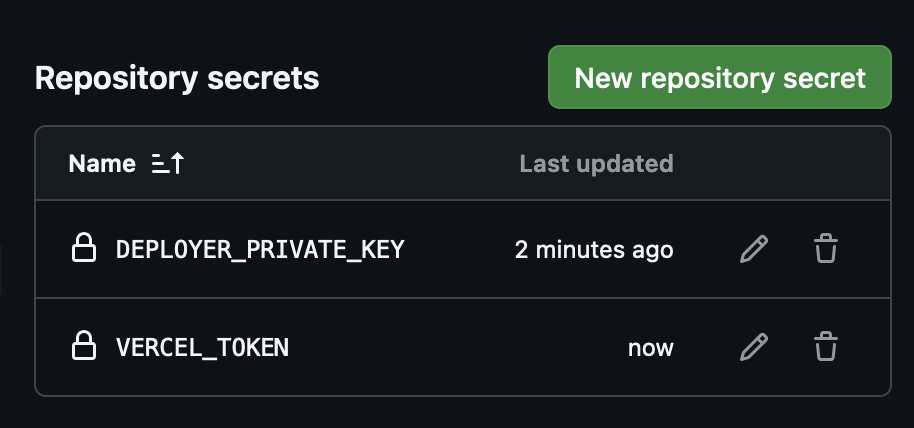
Now each time that you push your code, the GitHub action runs all the jobs, including compiling the contract, deploying it, and deploying the frontend app. When the run is finished you can follow the deployment on the Vercel deployment page (https://vercel.com/<ORG_NAME>/<PROJECT_NAME>/deployments) and the get the URL of your deployed application.